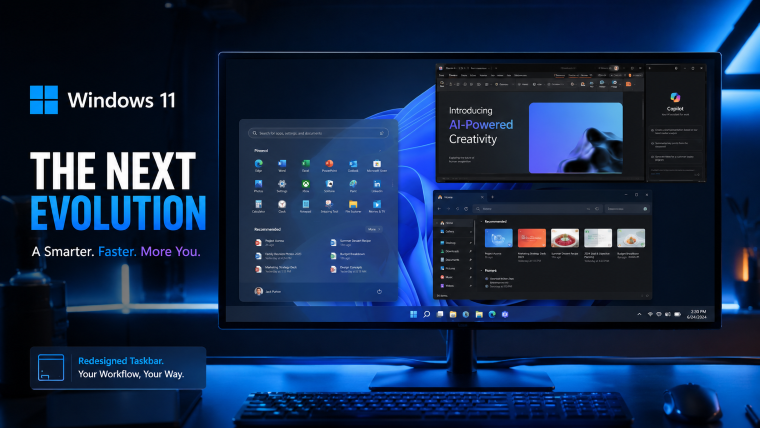
Windows 11 taskbar customization is finally becoming a reality as Microsoft tests major upgrades for the operating system’s taskbar and Start menu. The latest Windows 11 Insider Preview Build introduces smaller taskbar buttons, customizable Start menu layouts, improved file recommendations, and the long-awaited ability to move the taskbar to different sides of the screen. These new features show that Microsoft is finally responding to years of feedback from Windows users demanding more personalization and flexibility.
According to Microsoft Official Website and reports from BleepingComputer, the company is actively testing these features in Windows 11 Insider Preview Build 26300.8493 before a wider public rollout later in 2026.
Windows 11 Taskbar Customization Finally Adds More Freedom
The biggest highlight of the latest update is the improved Windows 11 taskbar customization system. Since Windows 11 launched in 2021, users repeatedly criticized the operating system for removing many useful customization options that were available in Windows 10.
Microsoft now appears ready to reverse some of those decisions.
With the new Insider Preview Build, users can finally resize taskbar buttons and switch to smaller icons. This allows the taskbar to take up less space on the screen while giving applications more room for productivity and multitasking.
The feature is especially useful for laptop users and people working on smaller displays where every bit of vertical screen space matters.


Microsoft designer Diego Baca confirmed that taskbar flexibility has been one of the most requested missing features in Windows 11. Users can now move the taskbar to the top, left, right, or bottom side of the display, giving them more control over how their desktop looks and functions.
Unlike older Windows versions that sometimes required restarting Explorer or signing out, these updates apply instantly without requiring a full restart.
Windows 11 Start Menu Update Gives Users Better Control
The latest Windows 11 Start menu update also introduces several important improvements aimed at simplifying the user experience.
One of the biggest complaints about Windows 11 was the Recommended section inside the Start menu. Many users felt the recommendations were unnecessary or distracting because they displayed files and applications users did not always want to see.
Microsoft is now allowing users to disable Recommended content completely.
This means users can create a cleaner and more organized Start menu focused entirely on pinned applications. The company is also introducing adjustable Start menu sizing so users can choose between compact and expanded layouts depending on their preferences.


According to Microsoft, the new controls are designed to work together. Users who prefer a minimal interface can disable multiple sections, while those who want full recommendations and app visibility can keep every option enabled.
The company still plans to display recently installed applications because it believes this helps users discover software downloaded from the Microsoft Store.
Windows 11 Insider Preview Build Improves File Recommendations
Another major improvement in the Windows 11 Insider Preview Build involves smarter file recommendations inside the Start menu.
Microsoft says it is redesigning how files are displayed by prioritizing content users are most likely to open. Instead of showing random or less relevant files, the system will use recent activity patterns to improve recommendation accuracy.
This feature could become highly useful for office workers, students, and professionals who regularly switch between multiple documents and applications throughout the day.
The company is also testing a privacy-focused feature that allows users to hide their profile name and picture from the Start menu. Although this may seem like a small change, many users prefer cleaner interfaces without unnecessary account information appearing on the screen.
Microsoft Windows 11 Features Continue Evolving
These latest Microsoft Windows 11 features are part of the company’s broader effort to modernize Windows while responding more directly to user feedback.
Since its launch, Windows 11 has received mixed reactions from the technology community. Many users appreciated the cleaner design and modern appearance, but others criticized the operating system for limiting customization options compared to Windows 10.
Now Microsoft appears more focused on balancing modern design with practical usability.
The company has also invested heavily in WinUI 3, performance optimization, AI-powered productivity tools, and interface refinements across the operating system.
Industry analysts believe these improvements are important because Microsoft wants more users to upgrade before Windows 10 reaches the end of official support.


7
Competition from operating systems like Apple macOS and customizable Linux desktop environments has also increased pressure on Microsoft to deliver better personalization features.
Why Windows 11 Taskbar Changes Matter
The new Windows 11 taskbar changes may appear small at first glance, but they solve several real-world usability problems.
For example, users with ultrawide monitors often prefer placing the taskbar at the top or side of the display for easier navigation. Meanwhile, users working on compact laptops benefit from smaller taskbar buttons because they gain additional workspace for applications and browsing.
Gamers, developers, and content creators may also appreciate the cleaner layout and improved multitasking flexibility.
Before this update, many users relied on third-party software to restore classic Windows functionality. By adding these options directly into Windows 11, Microsoft reduces the need for external customization tools while improving system stability.
The update also signals a major philosophical shift for Microsoft. Instead of forcing all users into one interface style, the company appears more willing to support different workflows and user preferences.
User Reactions to the New Windows 11 Features
Early reactions from Insider Preview testers have mostly been positive.
Many users on technology forums praised Microsoft for finally listening to community feedback after years of complaints regarding taskbar limitations. Social media discussions about the update quickly gained traction, especially among long-time Windows users who missed classic customization features.
Technology experts believe the return of taskbar positioning options could become one of the most popular Windows 11 improvements so far.
However, some users still want additional functionality, including the ability to fully ungroup taskbar icons, deeper Start menu customization, and further performance improvements.
Microsoft has not confirmed whether all experimental features from the Insider Preview Build will reach the stable public version. The company often tests features internally before deciding which ones become permanent additions.
Expected Release Date for the New Features
Currently, these updates remain limited to Windows Insider Preview testers. Microsoft has not officially announced a global release date yet.
Based on previous rollout timelines, experts expect some of these changes to arrive in future Windows 11 feature updates later in 2026.
If testing continues successfully and user feedback remains positive, the features could become standard across upcoming Windows 11 releases.
Final Thoughts
Microsoft is finally delivering meaningful improvements that many users have requested since the launch of Windows 11. The latest Insider Preview Build introduces smarter customization tools, flexible taskbar positioning, improved Start menu controls, and cleaner personalization settings.
The update may not completely transform Windows 11 overnight, but it clearly shows that Microsoft is becoming more responsive to user feedback.
For users frustrated by limited customization options, these upcoming features could significantly improve the overall Windows experience. If Microsoft continues expanding personalization while maintaining performance and stability, Windows 11 could eventually become one of the most refined and user-friendly versions of Windows in recent years.
READ MORE ARTCILES